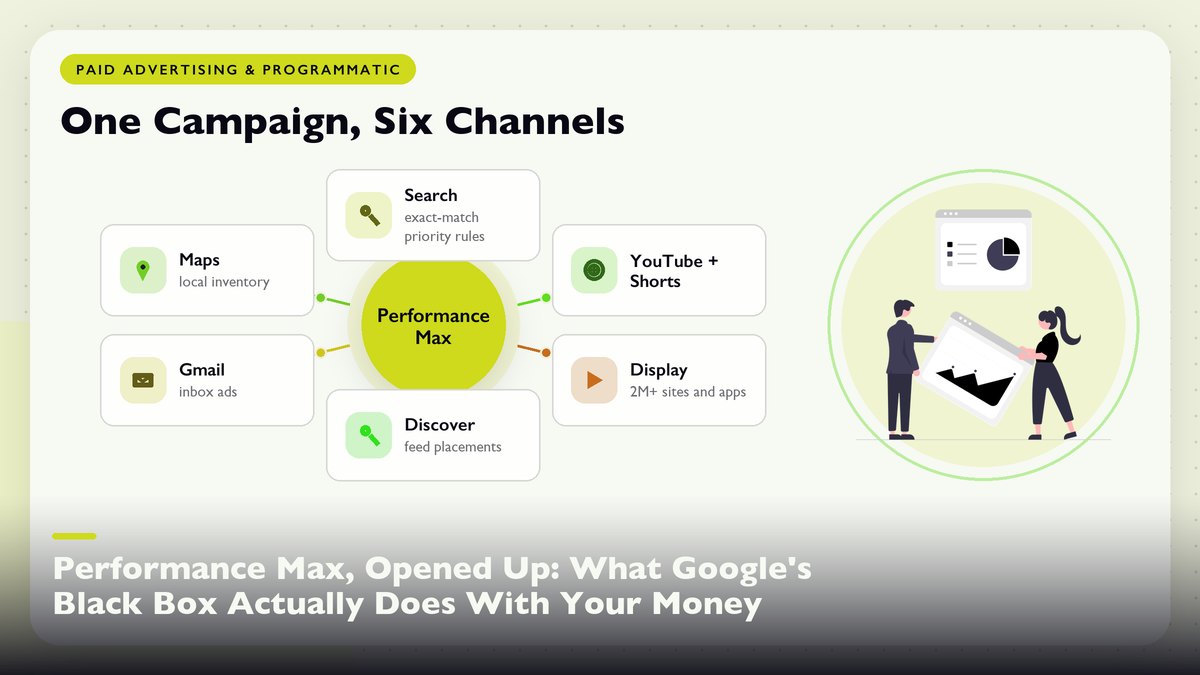
Performance Max arrived at Google Marketing Live in May 2021 with a pitch that sounded almost too convenient: hand Google your headlines, images, videos, and a budget, and one campaign would buy placements across Search, YouTube, Display, Discover, Gmail, and Maps. A little over a year later the convenience turned compulsory. In September 2022, Google auto-migrated every Smart Shopping and Local campaign into the new format, and a large share of ecommerce advertisers didn’t get to decide whether to try it, because the migration decided for them and the old campaign types stopped accepting new budget.
Four years on, Performance Max is still the most argued-about campaign type in Google Ads. The argument exists because the format reports so much less than a standard Search campaign while spending so much more of the average account’s money. You can’t see the search queries that triggered your ads in a normal report. You can’t set a bid per channel. Until recently you couldn’t even tell how the budget split between YouTube and the Display Network. What you get instead is a single conversions number and a strong suggestion that you stop asking questions.
This guide opens the box as far as the current reporting allows. It covers what the campaign type does with your money, which levers Google has handed back since 2021 (more than most advertisers realize), where the format usually earns its budget and where it tends to waste it, plus a launch sequence that avoids the three mistakes that burn most of a first month’s spend.
In this article
What Performance Max actually is
Performance Max is a goal-based campaign type that buys across all of Google’s ad inventory from a single campaign. Google’s own overview of how Performance Max campaigns work describes it as a way to complement your keyword-based Search campaigns rather than replace them, though in practice it has absorbed them for plenty of accounts. One budget and one bid strategy reach Search results, YouTube and Shorts, the Display Network’s two million-plus sites and apps, the Discover feed, Gmail inboxes, and Google Maps.
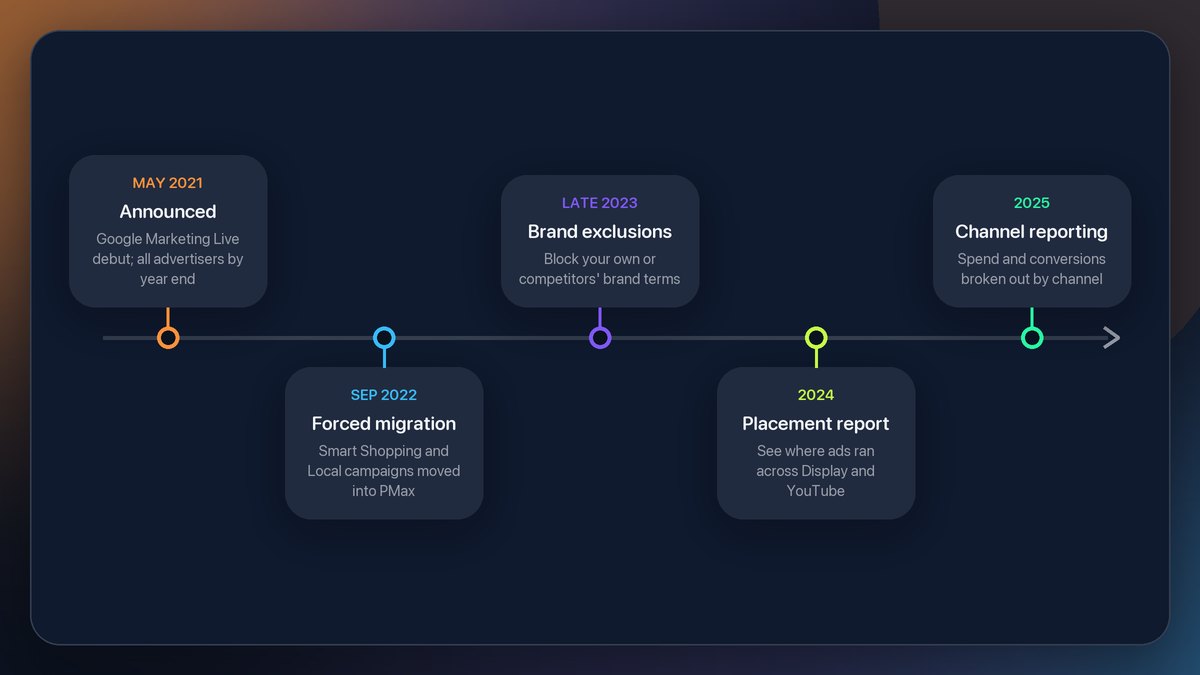
The timeline matters because each stage changed what advertisers could see or block. Google announced the format in May 2021 and opened it to all advertisers by the end of that year. The September 2022 migration of Smart Shopping and Local campaigns turned it into the default ecommerce format overnight. Through 2023 Google rolled out brand exclusions, in early 2024 it added campaign-level negative keywords and a placement report, and in 2025 it finally shipped channel-level reporting. Discovery campaigns, the other automated format from that era, went a different way and became Demand Gen in 2023, so Performance Max remains the only option that spans every surface at once.
Under the hood, the format runs on the same Smart Bidding machinery as a Maximize conversions campaign, extended so that one model decides creative assembly and channel selection at the same time. Every auction it enters is a joint decision about which user to show, on which channel, assembled from which of your headlines and images, and at what price. Google resolves all of that in the roughly 100 milliseconds before a page renders. That joint optimization is the real innovation, and in my view it’s also why the reporting stays thin: a combined system doesn’t decompose neatly into per-channel rows, so Google mostly doesn’t offer them.
How the machine decides where your ad goes
The inputs you hand the campaign are a product feed for retail, a set of creative assets, a conversion goal with values attached, an audience signal, and optionally a list of search themes. Everything else is inference on Google’s side. On Search specifically the campaign is keywordless: it reads your assets and your feed, predicts which queries signal a likely converter, and bids into those auctions without you ever naming a keyword.
Two rules govern how that keywordless matching coexists with your ordinary Search campaigns. When a query exactly matches a keyword in a standard Search campaign, the Search campaign takes priority and Performance Max steps aside. For every other query, the two compete on Ad Rank like any other pair of eligible campaigns, which means a strong Search campaign and a strong Performance Max campaign can end up bidding against each other on the same broad queries, with Google’s auction rather than your media plan deciding the winner.
Audience signals deserve a careful read, because the name implies targeting while the behavior is closer to seeding. You can attach a custom segment built from recent searchers, a remarketing list, or a demographic profile, and Google will bias early spend toward people who resemble that audience. Once the model finds converters elsewhere, though, it serves beyond the signal without asking, and there’s no setting that fences it in. Search themes work the same way. Introduced in beta in late 2023 and capped at 50 per asset group, they tell the system which queries you care about, and they influence matching the way broad match does rather than restricting it the way exact match would.
The setting that surprises people most is Final URL expansion, which is on by default. With it enabled, Google can ignore the landing page you specified and send clicks to any page on your domain it predicts will convert. That’s usually how a campaign built for one product line ends up spending on your homepage or an outdated clearance page, depending on what the model happens to favor that week. You can turn expansion off entirely or exclude specific URL paths. For most lead-generation accounts I’d turn it off on day one, because an automated system choosing landing pages is only safe when every page on the domain is somewhere you’d willingly pay for a click to land.
What you still control
The creative container is the asset group, and its specification is precise enough to plan around. You get up to 15 headlines of 30 characters each, 5 long headlines of 90 characters, 5 descriptions of 90 characters, and a business name capped at 25 characters. Images run up to 20 per group in three required sizes: 1200×628 horizontal, 1200×1200 square, and 960×1200 portrait. On top of that sit up to 5 logos and up to 5 videos with a 10-second minimum. Google’s asset group build documentation lists the full requirements, and the video slot is the one worth obsessing over: if you upload nothing, Google assembles an auto-generated video from your still images and headlines, and those machine-made videos are widely considered the weakest creative the format serves.
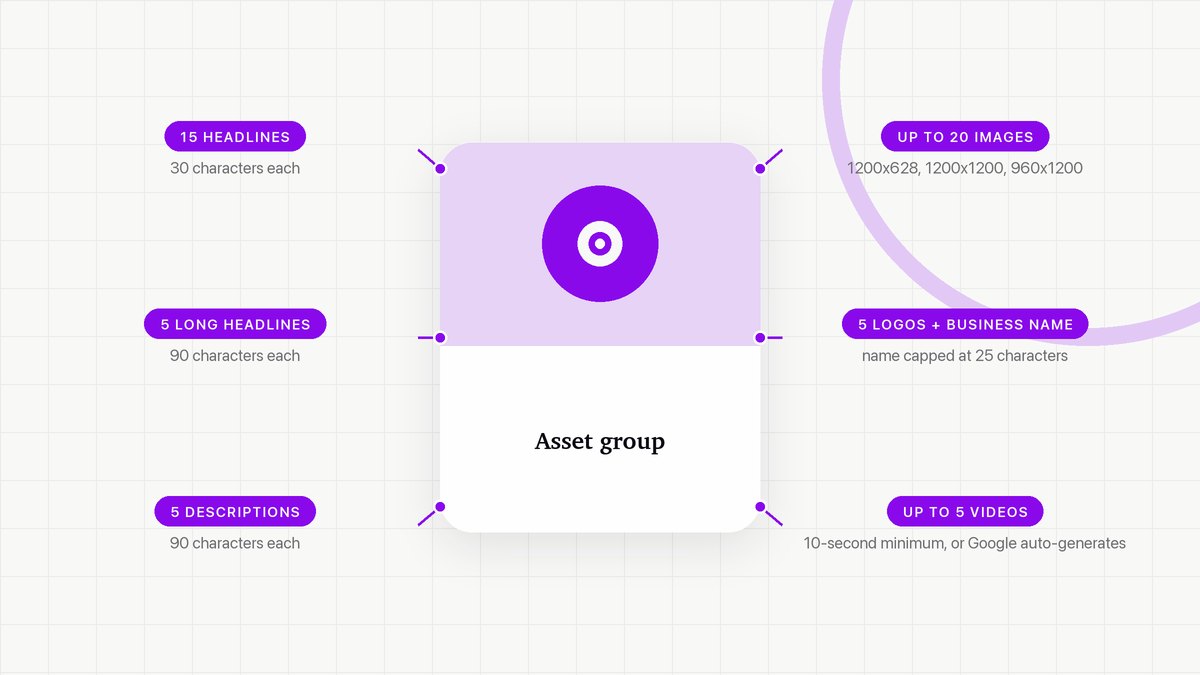
Structure the groups around themes you want to report on separately, because asset groups are the finest reporting grain the format offers. One group per product line or service category turns the asset group table into a rough proxy for per-product performance, while a single catch-all group hands you one blended number for everything. Filling every slot matters mechanically as well. A group with the full set of headlines, descriptions, images, and a real 15-second video gives the assembly engine room to test combinations, whereas a half-filled group forces it to reuse the same few assets in every placement.
Retail accounts have a second control surface in the Merchant Center feed, and it’s usually neglected. Product titles run up to 150 characters and the front of the title carries most of the matching weight, so a title that starts with the brand and product type (“Acme 12-cup drip coffee maker, stainless”) gives the system far more to work with than one that starts with a SKU. Feed disapprovals and stale prices shrink the inventory Performance Max can serve, and in practice none of that shows up anywhere in Google Ads reporting.
The guardrails have improved substantially since launch, and most accounts I audit still haven’t turned them on. Brand exclusions, rolled out through 2023 and documented in Google’s brand exclusions instructions, keep the campaign from serving on branded searches you select, which stops Performance Max from padding its conversion numbers with people who were going to buy anyway. Campaign-level negative keywords arrived in early 2024 and behave the way negatives always have, and the older account-level lists described in Google’s negative keywords documentation still apply across the whole account. There’s also a new customer acquisition goal that bids higher for buyers who aren’t in your customer list, which is the closest the format comes to a growth lever you can actually aim.
The reporting problem, and what’s changed
The native feedback loop inside Performance Max is thin by design. Assets get rated Learning, Low, Good, or Best, but those grades are relative to the other assets in your own campaign, so a headline marked Best in a weak group can still be losing to anything a competitor shows. Google never shipped a search terms report for the format. What you get instead is search terms insights, which cluster queries into themes with rough volume buckets and never show you the queries themselves. Conversions arrive as one campaign-level number, attributed across channels you can’t separate.
Two additions since 2024 have loosened that considerably. A placement report, added in 2024, shows where ads ran across Display and YouTube, which finally made it possible to find the mobile game apps and parked-video placements that used to absorb budget invisibly. The 2025 Performance Max feature update went further and introduced channel-level reporting, breaking spend and conversions out by Search, YouTube, Display, Discover, Gmail, and Maps. That was the first time in the format’s history that advertisers could see, in Google’s own numbers, how much of a supposedly search-driven campaign was actually buying cheap Display impressions.
Even with those reports, incrementality is still your problem to solve. Because Performance Max happily serves on your brand terms unless excluded, a campaign can post a healthy-looking cost per conversion while mostly harvesting demand that already existed, and the channel report won’t flag that for you. The cleanest test is the boring one: apply brand exclusions, then watch total account conversions for a few weeks rather than the campaign’s own number, and judge the format on whether the whole account grew. I’d also export the channel report monthly, since a slow drift of budget from Search toward Display is exactly the kind of change that never triggers an alert.
When it earns its budget, and when it doesn’t
The format is at its best in retail accounts with a clean Merchant Center feed, real conversion values, and enough volume to feed the model. Google’s own setup guidance recommends a daily budget of at least three times your target cost per acquisition, and the learning period after launch or any significant edit runs roughly two to three weeks. A $50 target CPA therefore implies a $150 daily budget, around $4,500 a month, and a month of patience before the numbers mean anything. Google has never published a hard minimum, but its bidding documentation has long treated somewhere around 50 conversions in 30 days as the point where target-based bidding settles down, and accounts below that line usually see erratic results no matter how good the assets are.
The riskier fit is lead generation built on a soft conversion. If the only signal you send back is a form fill, the system will optimize toward whatever produces form fills, and in practice that drifts toward low-intent placements, giveaway-style queries, and junk leads that never pick up the phone. The channel and placement reports make this visible now, but visibility isn’t prevention. Accounts in this position need offline conversion imports, or at least a qualified-lead conversion action, before Performance Max is safe to fund. Local service businesses have a related trap: a large share of their “leads” can turn out to be calls from people who searched the business name, which is exactly what brand exclusions exist to fix.
Tracking hygiene is the unglamorous prerequisite that decides everything downstream, because the model treats your conversion data as ground truth. The conversion action should fire exactly once per real action, carry an accurate value, and sit in the campaign’s goal rather than an account-default bucket that also counts page views or button clicks. If tracking breaks for a few days, say during a site migration or a tag manager mistake, use data exclusions to tell Smart Bidding to ignore that window. Otherwise the model learns from the outage and spends the next two weeks relearning what it already knew. The exclusion is worth setting the day you spot the gap rather than after the invoice arrives, because by then the bad data has usually already shaped a week of bids.
A launch sequence that avoids the expensive mistakes
Most failed first attempts share the same shape. Tracking double-fires, no exclusions are set, the asset group is half-filled, the budget is too small to learn on, and the advertiser edits something every few days so learning restarts each time. The sequence below reverses all five, and it maps closely to Google’s own published setup advice.
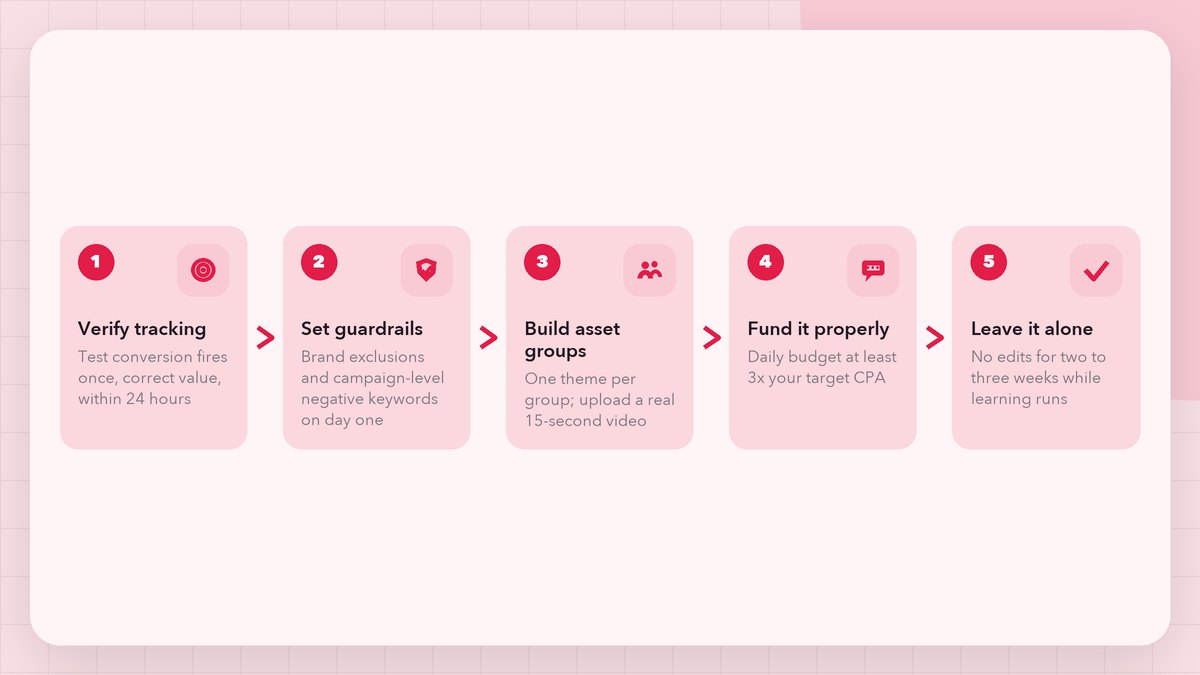
Start with the conversion action, not the campaign. Trigger a real test conversion and confirm in Google Ads that it registered once, with the correct value, within 24 hours; if it shows twice, or shows zero, nothing downstream is worth building yet. Then set the guardrails before spend begins. Apply brand exclusions for your own brand terms, attach an account-level negative keyword list covering the obvious junk for your vertical (a first list of 20 to 50 terms like jobs, free, login, and salary usually does it), and decide on Final URL expansion deliberately rather than accepting the default.
Build one asset group per theme with every slot filled, including a real 15-second video shot on a phone if that’s what it takes, because an auto-generated video is worse than an imperfect one. Fund the campaign at three times your target CPA and set the goal to new customer acquisition if growth is the point. Then leave it untouched for two to three weeks: no asset swaps or budget nudges, since each significant edit, even a small bid strategy change, restarts the learning period you’re paying for. Budget changes count as edits too, so as a working rule keep any single increase under about 20% in a day once the campaign is performing; a doubled budget is treated by the model as close to a new campaign.
When the learning period ends, read the reports in a fixed order: channel split first, search terms insights second, asset ratings last. That sequence goes from the most structural problem to the most cosmetic one. A campaign spending 60% of its budget on Display with a weak cost per conversion needs a strategy change, while a campaign with a healthy channel split and two Low-rated headlines needs a copy edit. Confusing the two is how accounts end up rewriting headlines for a budget-allocation problem.
The bottom line on the black box
Performance Max in 2026 is a different product from the one Google forced on Smart Shopping advertisers in 2022. Brand exclusions, campaign-level negatives, placement reporting, and channel-level reporting have converted it from a pure black box into something more like a locked room with windows: you still can’t steer, but you can finally see where it’s driving. Used with guardrails, a realistic budget, and clean conversion data, it earns a place as one line item alongside standard Search. Used as a default dumping ground for budget, it will keep doing exactly what it was designed to do, which is spend the money.