
Most site migrations don’t fail because Google punishes change. They fail because someone typed Redirect 301 / https://newsite.com/ into an .htaccess file and called it a day. Google’s own documentation says permanent redirects pass PageRank without loss, and sites still drop out of the results for weeks because the mapping was incomplete, the old sitemap still pointed at dead URLs, or nobody thought to lower the DNS TTL before moving the server. For a small site that gets 80% of its traffic from twenty blog posts, one sloppy afternoon can erase a year of content work.
The reassuring part is that Google has published its side of the process in unusual detail. The site move documentation explains what the search engine does when your URLs change, how long to keep redirects alive, and why a temporary ranking dip is normal rather than catastrophic. This article turns that documentation, plus the redirect and canonicalization references that go with it, into a checklist a solo operator can actually run, with the failure modes that tend to bite sites under about 500 pages.
In this article
- What Google actually does during a move
- Decide which kind of move you’re making
- Phase 1 — Freeze and inventory (two weeks out)
- Phase 2 — Build the mapping and the redirects
- Phase 3 — Canonicals, internal links, and sitemaps
- Launch day and the Change of Address tool
- Media, files, and the URLs nobody remembers
- The monitoring window — weeks 1 through 8
- The failure modes, condensed
- The cases where you shouldn’t migrate at all
What Google actually does during a move
When Googlebot crawls an old URL and receives a 301 response, it records the redirect and associates the signals from the old address with the destination. The documentation states this plainly: “301 and other permanent redirects don’t cause a loss in PageRank.” The ranking dip people experience after a migration isn’t a penalty. It’s the indexing pipeline re-processing every URL, and Google advises keeping redirects in place for at least a year, because its systems need to see a redirect multiple times before the change is fully recorded.
How fast that re-processing happens depends on how often Googlebot visits you. A site that gets crawled once a week will settle in a few weeks; a site with 40 posts that Google crawls monthly can take a quarter to fully transition. You can hurry it slightly by submitting the new sitemap immediately and using URL Inspection on the new homepage, but the crawl schedule sets the pace, which is why the guidance says to expect temporary fluctuation rather than promise a fixed recovery date.
Two implications follow for a small site. A move done with correct one-to-one redirects is a bookkeeping operation for Google, and your old links still count. And the danger window is measured in weeks, so the migration isn’t over on launch day; it’s over when Search Console shows the new URLs indexed and stable. Plan your client’s expectations, or your own nerves, around a 4-to-8-week settling period, and longer if the site is rarely crawled.
Decide which kind of move you’re making
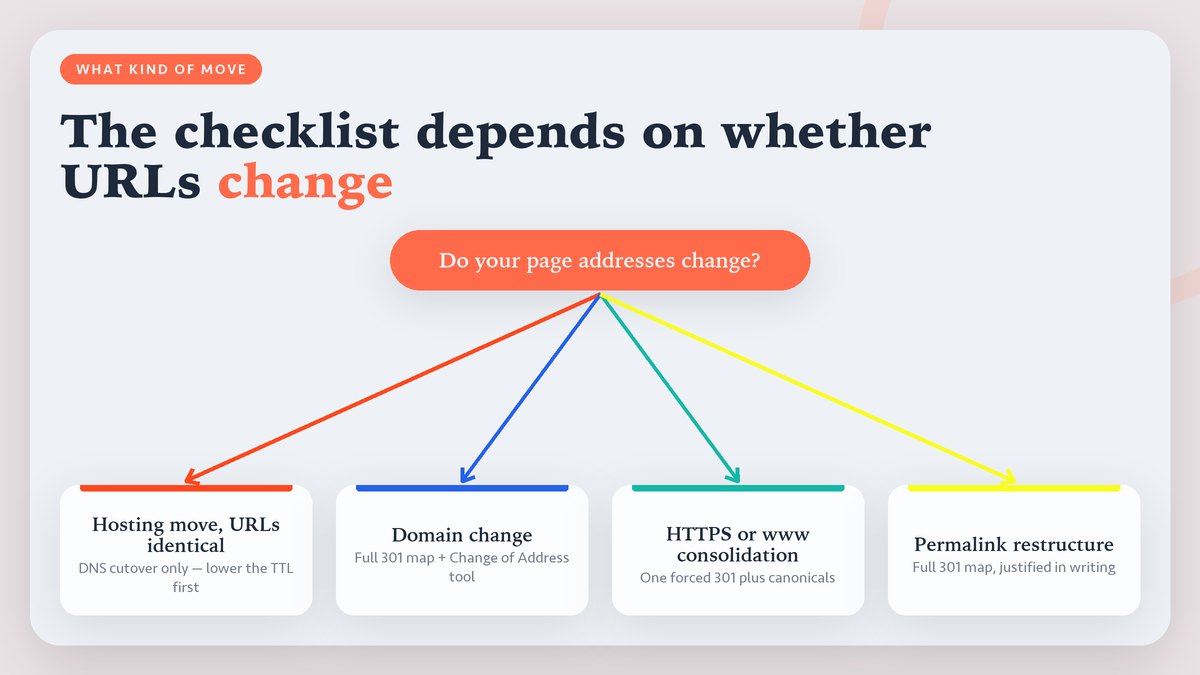
Not every migration changes URLs. Moving from one host to another (shared hosting to a VPS, or your old provider to Cloudflare-fronted infrastructure) while keeping the domain and URL structure identical is a different operation from a domain change or an HTTP-to-HTTPS switch. Google’s guidance for hosting changes is refreshingly short: if the URLs don’t change, there’s nothing to tell Search Console, and the whole job is making the DNS cutover clean.
That clean cutover still has a checklist of its own. Lower the TTL a day or two before the switch, copy the site to the new stack, and run both in parallel for a few days if your plan allows it, so a rollback is just a DNS flip back. Keep the URL structure byte-identical, including trailing-slash behavior and the case of every path, because a hosting move that quietly changes /About to /about has turned itself into a URL-changing move halfway through.
The checklist below is for URL-changing moves: domain changes, HTTPS switches, www-or-non-www consolidation, and permalink-structure overhauls. Those are the moves where every old address has to map to a new one. Before committing to one, write down the business reason. A rebrand or a bought-out domain justifies it. Changing /blog/post-name to /insights/post-name because the new structure “reads better” usually doesn’t, since you can get most of that benefit from internal linking and templates instead of rewriting 200 addresses that other sites already link to.
Phase 1 — Freeze and inventory (two weeks out)
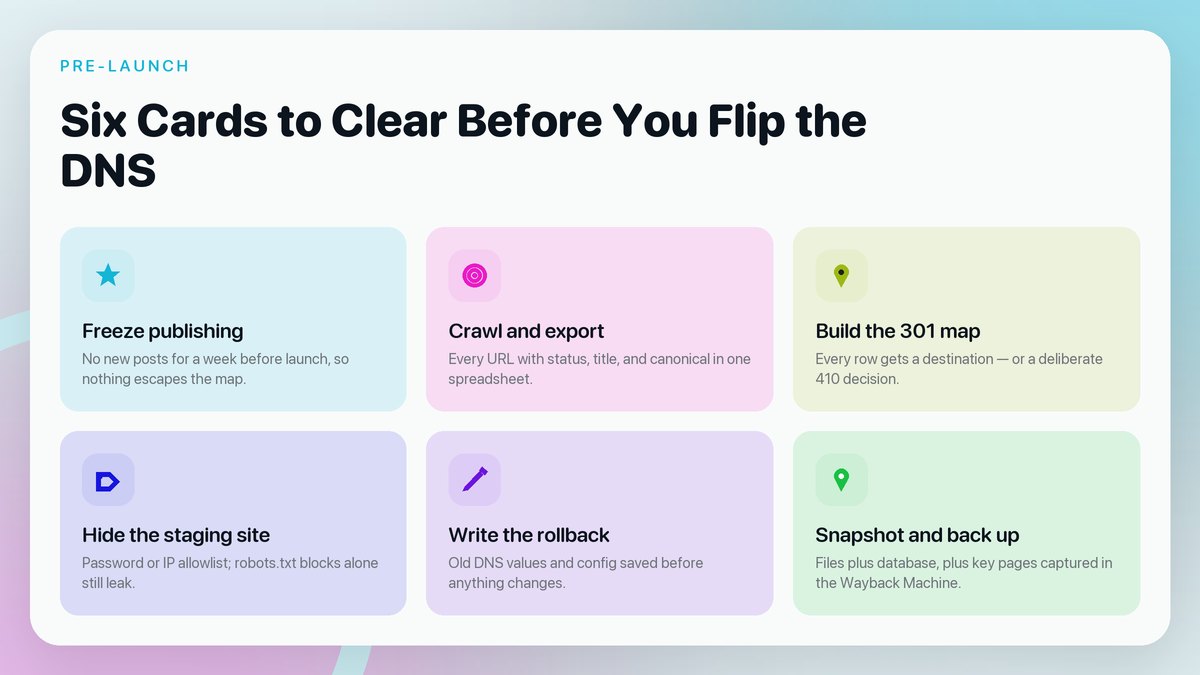
Content freezes sound bureaucratic until someone publishes a post on the old domain three days before launch, and that post, with zero backlinks and fresh timestamps, becomes a loose end nobody mapped. Freeze publishing at least a week before the switch, and pull a complete URL inventory while the site is static. Crawl the site with Screaming Frog’s SEO Spider (the free edition covers up to 500 URLs, which handles most small business sites) or with any crawler that exports a spreadsheet. You need every address with its status code, title, and canonical in one file, because that export becomes the backbone of the redirect map.
Take a snapshot of the old site before you touch it, in two forms: a full backup of the content database or files, and a capture of a few dozen representative pages in the Internet Archive’s Wayback Machine. The backup is for the rollback; the archive is for the audit, because three months later, when someone asks whether the old product page mentioned the five-year warranty, you don’t want the answer to depend on a redirect that no longer resolves.
Every row of that crawl export needs a destination on the new site: identical path where possible, nearest equivalent where not, and a deliberate decision for anything you’re dropping. The rows you can’t fill are the dangerous ones, because they become 404s that had backlinks. Export your top-linked URLs from Search Console’s Links report too, since those are the addresses with actual equity attached. A 301 that eventually lands a journalist’s 2019 link on your new homepage instead of the article they cited is how you quietly lose referral traffic that no ranking recovery will bring back.
Stage the new site somewhere Google can’t index it. The reliable way is HTTP basic authentication in front of the staging hostname or an IP allowlist; noindex meta tags and robots.txt blocks both leak or fail in predictable ways. Robots.txt blocking prevents crawling, but a discovered staging URL can still be indexed from its links, which is how staging.newsite.com ends up competing with the real domain in results. If your host gives you a one-click staging environment on a subdomain, check that it isn’t linked from anywhere public, and delete it after launch instead of letting it linger as a duplicate copy of the entire site.
Phase 2 — Build the mapping and the redirects
This is where the technical work lives, and the reference worth keeping open is the redirects and Google Search documentation together with the status-code definitions in RFC 9110. The short version: 301 and 308 mean the move is permanent and the new address should replace the old one in search results, while 302 and 307 mean temporary. Using a temporary code for a permanent migration is the classic way to end up with the old URLs still ranking months later. On Apache you’ll write rules in .htaccess using mod_rewrite’s RewriteRule syntax; on nginx the same job is a return 301 line in the location block, which is faster and easier to audit.
Order the rules from most specific to most general, because the first matching rule wins on both platforms. Individual page mappings go at the top, a dated-folder pattern like /blog/(.*) to /insights/$1 goes in the middle, and any catch-all goes last. For content you’re deliberately killing, return a 410 Gone instead of redirecting it; the redirect documentation treats 410 as a clear removal signal, and it stops Google from re-crawling a dead page for months the way it does with 404s.
Three rules separate a clean redirect layer from a brittle one. Redirect each page to its matching new page rather than sweeping everything to the homepage; a site-wide redirect to the front page reads to Google like every old page died, which is how link equity gets stranded. Keep chains short: the site-move guidance says to point at the final destination directly, and if a chain is unavoidable, keep it to ideally no more than three hops and fewer than five. Test the map before launch by pointing a local hosts-file entry at the new server’s IP and crawling the old URLs against it, because finding a broken regex after the DNS flips means fixing it under live traffic.
Test with a script instead of clicking around. A shell loop with curl -sI against your top 200 old URLs will print the status code and Location header for each one in under a minute, and the output pasted next to your map catches the two errors humans miss: 301s that point at other redirecting URLs instead of final destinations, and 200 responses on addresses that were supposed to be gone. If a URL returns content on both the old and new address without a redirect or canonical relationship between them, you’ve built a duplicate pair, and Google will pick which one to rank, possibly the wrong one.
Query strings and trailing slashes are the quiet killers of this phase. Decide whether /about and /about/ are the same URL on the new site and redirect accordingly, or you’ll manufacture duplicate-content pairs on day one. Parameterized URLs (faceted search, UTM-tagged internal links, paginated archives) should collapse into clean canonical destinations rather than getting 200 unique rows in your map.
Phase 3 — Canonicals, internal links, and sitemaps
Redirects tell Google where a page went; canonicalization tells it which address to keep. The duplicate-URL documentation lists rel=canonical tags, redirects, and sitemap entries as among the signals Google weighs when it picks a canonical, which is exactly why your internal linking should point directly at the new URLs wherever you control it: navigation, footer links, in-text links, and the XML sitemap. If the new site still internally links to the old addresses and relies on redirects to sort it out, you’re asking Google to resolve a contradiction you could have deleted. In practice, the contradiction resolves in Google’s favor about as often as in yours.
The sitemap should list only canonical, 200-status new URLs. Google’s sitemap guidelines cap a single file at 50,000 URLs or 50 MB uncompressed, which no small site will approach, but the discipline of listing only live pages pays off in cleaner indexing reports. Submit the new sitemap in Search Console at launch, and keep the old sitemap submitted temporarily too, since it helps Googlebot discover the redirect layer faster. Spot-check ten pages with the URL Inspection tool during week one; a correct “URL is on Google” result for the new addresses, and “Page with redirect” for the old ones, confirms the pipeline is working.
This is also the phase to update the absolute URLs hiding in places people forget: Open Graph tags, structured data, RSS feed URLs, the analytics property settings, and the address hard-coded in your email platform’s templates so your newsletter links stop routing through redirect chains.
Launch day and the Change of Address tool
For a domain change, use the Change of Address tool in Search Console once the new property is verified. It acts as an additional move signal alongside the redirects, though the documentation is clear it isn’t a substitute for them. For HTTPS or www consolidation moves, the tool doesn’t apply; the redirects and canonical alignment do all the signaling. Either way, the launch sequence is to lower the TTL on the DNS record a day or two ahead (many registrars default to 3,600 seconds or higher, and you’ll want 300 or less so a rollback propagates in minutes), flip the DNS or the server config, then immediately test a sample of old URLs: the top 50 from your Links report, plus one URL from each redirect rule pattern.
Have the rollback plan written down before you touch anything. The previous DNS values, the previous server config, and the exact command or dashboard click that restores them. Rollbacks after a partial cutover are chaotic precisely because nobody recorded what “before” looked like, and at 11 p.m. on launch day you’re not reconstructing a BIND zone from memory.
Media, files, and the URLs nobody remembers
Images and uploads carry their own URLs, and on a CMS they’ve usually accumulated years of junk paths: /wp-content/uploads/2019/03/ dated folders, resized variants, files uploaded twice under slightly different names. If the uploads directory structure changes in the move, every embedded image in every old post either breaks or flows through a redirect, and media redirects are the ones people never map because the images never appeared in the page crawl. Pull your media URLs from the crawl export separately and map the folder patterns, not just the pages.
The same sweep applies off-site. Social profiles, Google Business Profile, directory listings, podcast show notes, and partner sites all carry hard-coded links that no redirect can fix for humans who click them in apps. You don’t need to chase all of them; the 301s cover the SEO value. But the top twenty referring sources in your analytics account are worth a manual email or profile edit, because a redirect hop costs a fraction of a second and email clients handle them inconsistently.
The monitoring window — weeks 1 through 8
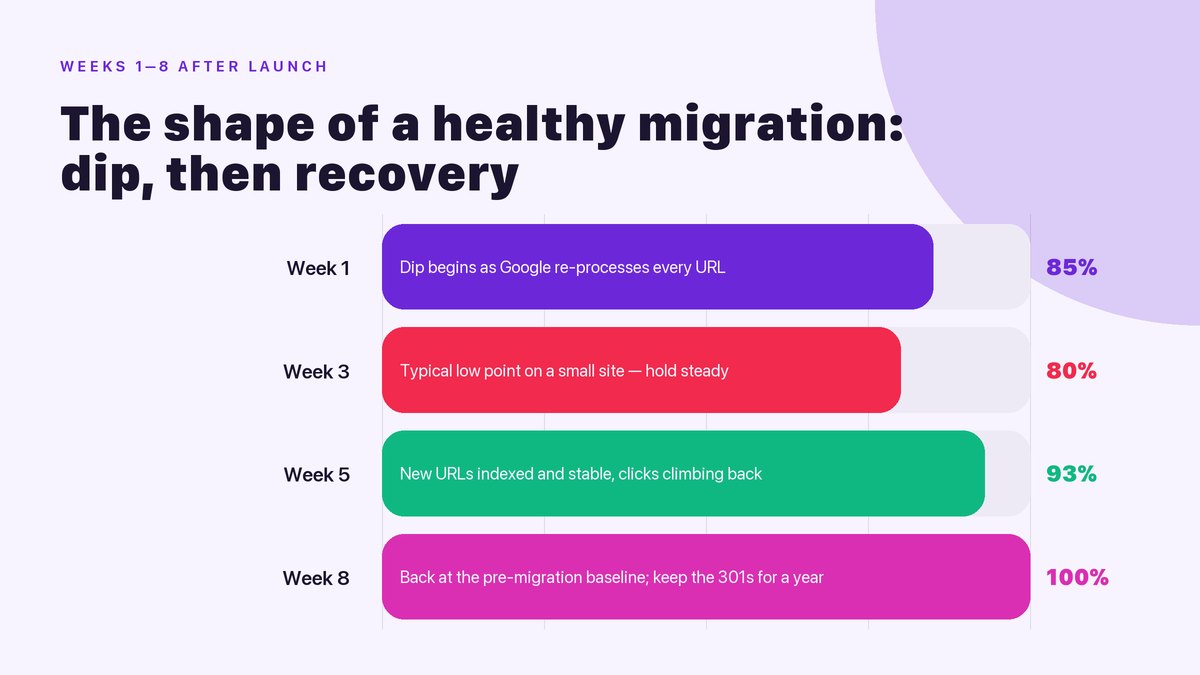
Expect the dip, measure it, and know what a normal one looks like. In Search Console, watch the Page Indexing report for spikes in “Page with redirect” and “Not found”; both are expected in week one, but “Not found” should trend toward zero as your map covers stragglers. An old URL showing “Crawled — currently not indexed” for weeks is usually a quality or duplication problem rather than a migration problem. Compare new-URL clicks against the pre-migration baseline in the Performance report: a 10-to-20% dip that recovers by week four to six is typical for a well-executed small-site move, while a flatline past week eight usually means some equity isn’t transferring, most often because of a chain, a missed page-to-page rule, or internal links still pointing at the old domain.
The Crawl Stats report, under Settings, tells you whether Googlebot is even showing up to the new addresses. A healthy migration shows crawl requests shifting from the old host to the new one within the first two weeks; if the old host’s numbers stay flat in week three, the redirects probably aren’t being seen, and the cause is almost always a DNS or firewall issue on the new stack rather than anything Google-side.
Annotation discipline matters more than most people expect. Export your Search Console performance data for the four weeks before launch and save it somewhere separate, then add an annotation in your analytics tool on launch day itself. Three weeks later, when you’re trying to remember whether the traffic drop started with the migration or with a seasonality pattern, that dated marker is the difference between a five-minute check and an afternoon of guesswork. Keep the old domain and its redirects alive for at least the year Google recommends; renewing a $12-a-year domain is the cheapest insurance in all of technical SEO. And resist the urge to clean up the redirect rules at month three because Search Console looks green, since external links you can’t see in any report (newsletter archives, PDFs, forum posts from 2017) keep flowing through them for years.
The failure modes, condensed
| What you did | What you’ll see | What to do about it |
|---|---|---|
| Everything 301s to the homepage | Old URLs stay indexed as duplicates; new pages rank weakly | Rebuild the map page-to-page and let the redirects re-process |
| 302 used instead of 301 | Old URLs keep ranking months after launch | Swap the status code server-side; no new mapping needed |
| Chains over five hops | “Redirect error” rows in the Page Indexing report | Point each rule at the final URL directly |
| Internal links still point at the old domain | Old address keeps getting crawled; canonical split | Update templates and in-text links to the new URLs |
| Redirects removed before a year | Backlink URLs 404 in waves months later | Restore the rules and renew the old domain |
The cases where you shouldn’t migrate at all
Knowing when not to run this checklist is worth as much as running it well. Skip the URL change if the real problem is slow hosting, because that’s a no-URL-change move with near-zero SEO risk. Skip it if the goal is fixing duplicate content from http/https or www variants, since canonical tags and a single forced redirect handle that without new URLs. And be honest about capacity: if nobody on the project can read a server config or a crawl export, the migration will be run by whatever the theme or plugin’s migration wizard decides to do, which is how a thousand .html pages become a thousand 302 redirects to a homepage.
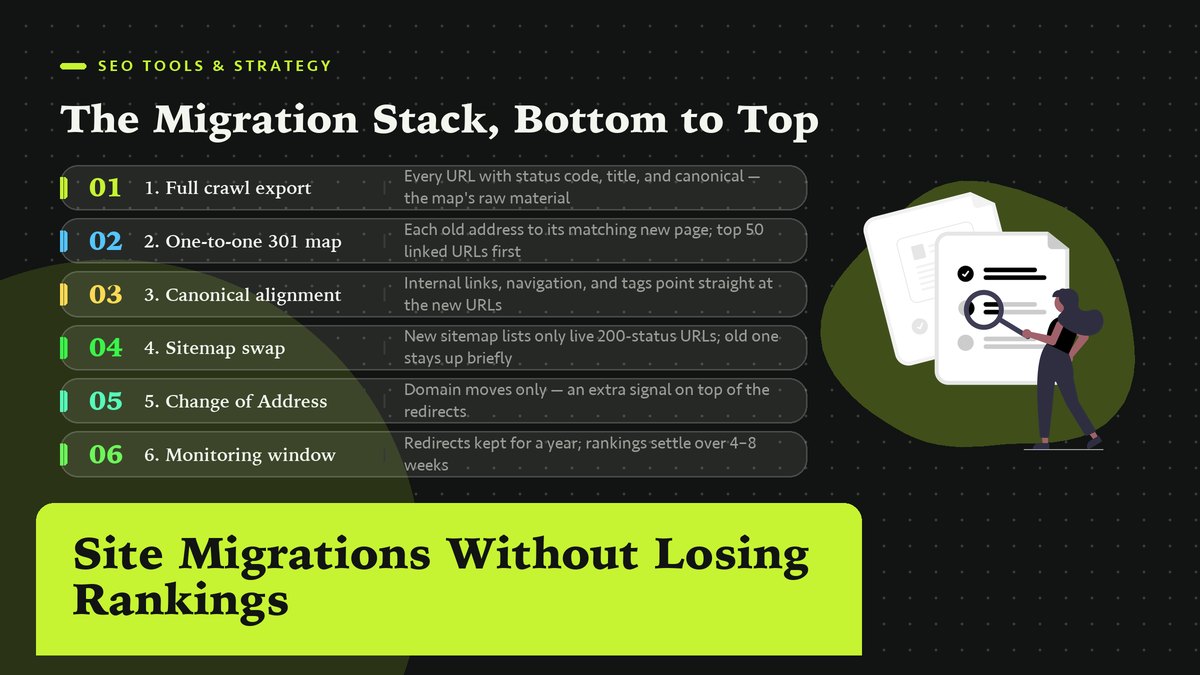
Handled in this order (inventory, one-to-one 301 mapping, canonical alignment, sitemap swap, Change of Address for domain moves, and a patient monitoring window), a migration is an administrative task with a known shape rather than a gamble. The sites that vanish after a move almost always skipped the map, not the documentation.