In this article
- The February deadline that made email authentication mandatory
- SPF: a guest list with a hard ceiling
- DKIM: a signature that survives the trip
- DMARC: the policy that ties the other two together
- Subdomains and forwarding: the two cases that break clean setups
- The rollout that doesn’t break your own mail
- The failures that show up in the reports
- The other half: spam rates and one-click unsubscribe
- Verifying the setup without trusting anyone’s dashboard
The February deadline that made email authentication mandatory
On October 3, 2023, Google and Yahoo published, within hours of each other, the same ultimatum. Starting February 1, 2024, anyone sending more than 5,000 messages a day to Gmail or Yahoo inboxes would have to authenticate that mail with SPF, DKIM, and DMARC. The same rules capped spam complaints at 0.3% and required one-click unsubscribe on marketing messages. Until that date the three protocols had been best practices that deliverability consultants nagged about. Afterward they became delivery requirements with teeth, because Gmail began answering unauthenticated bulk mail with a hard rejection, error 5.7.26, instead of a quiet foldering. The thresholds sound like they only concern mass senders, but the plumbing underneath applies to a 400-subscriber newsletter exactly as it does to a retailer’s Black Friday blast. Google’s sender guidelines now state plainly that even senders under the bulk threshold should run at least SPF or DKIM. The same page asks for a Postmaster Tools spam rate below 0.3% and messages formatted to the RFC 5322 standard that’s been around since 2008.
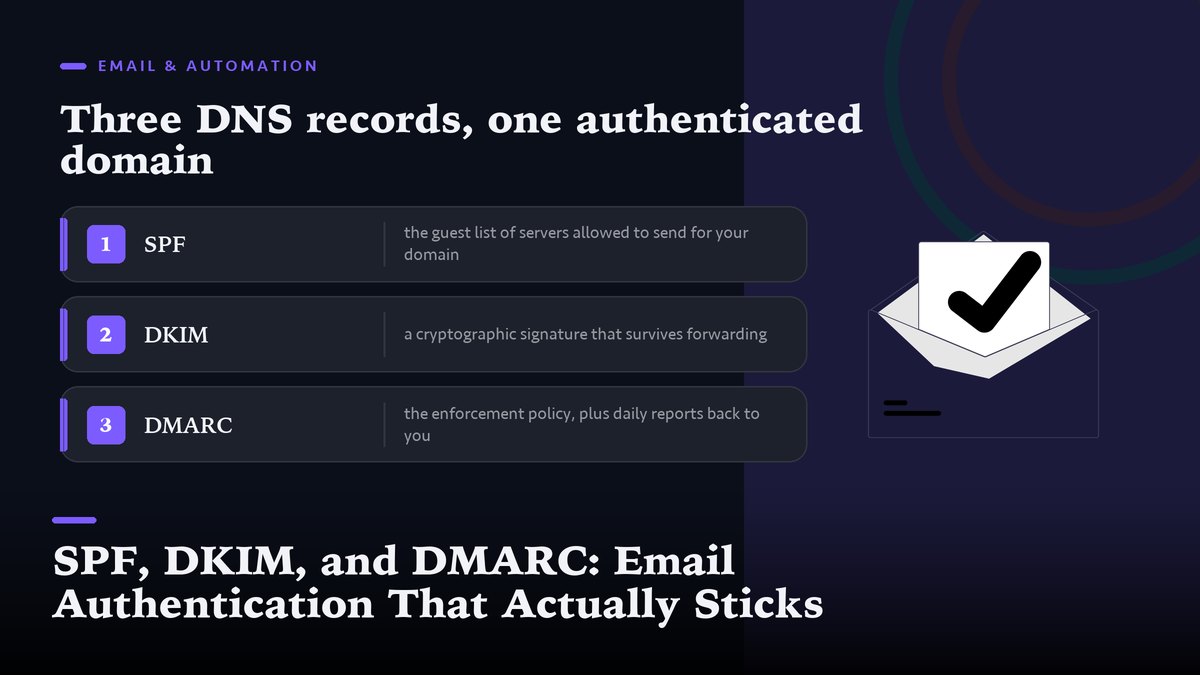
The awkward part is that most small senders never set up any of this themselves. Their email service provider did, partially, at signup, and the result is usually a domain that passes some checks some of the time. The newsletter tool signs its own mail. The invoices sent from QuickBooks and the contact-form notifications from the website usually go out unauthenticated from the same domain, and receivers see the mixture. DMARC doesn’t grade on a curve, so a domain that authenticates 70% of its mail can in practice end up treated worse than one that authenticates nothing, because the failures look deliberate rather than accidental. Getting the setup right is roughly an afternoon of DNS work, but only if you understand what each of the three records actually proves, which is where most guides stop short.
SPF: a guest list with a hard ceiling
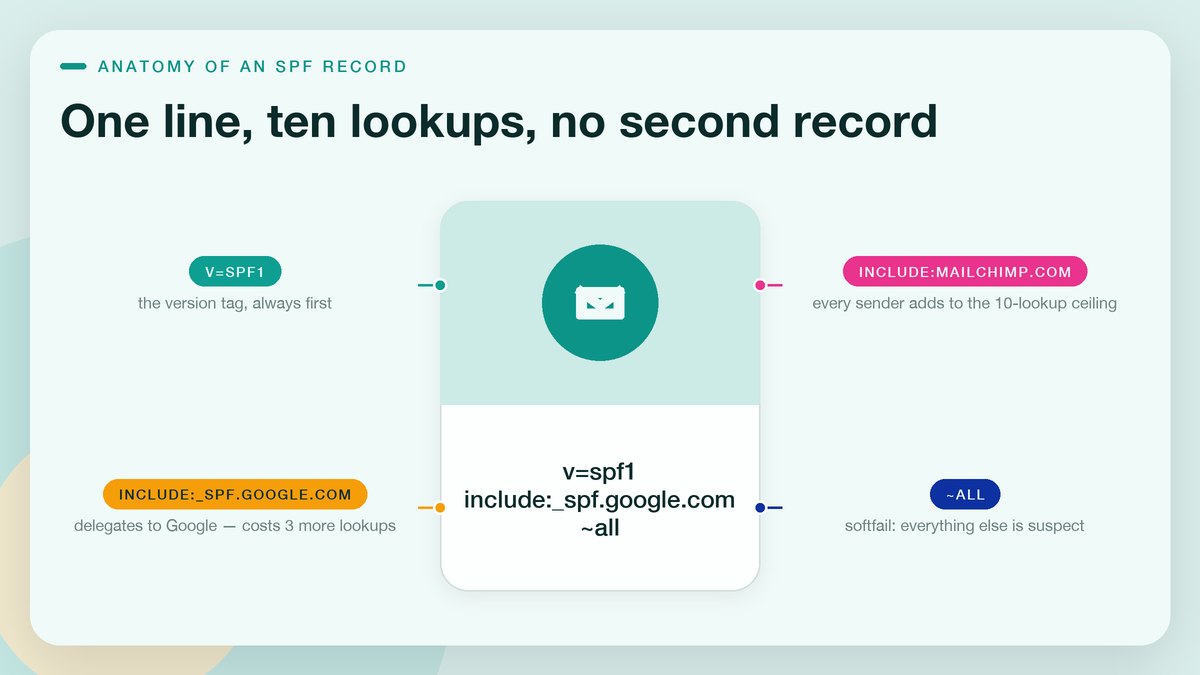
SPF, specified in RFC 7208 and stable since April 2014, is the oldest of the three protocols and the simplest idea. A TXT record in your DNS lists which servers are allowed to send mail for your domain. A receiver takes the envelope sender’s domain, looks that record up, and checks whether the connecting IP appears in it. The record itself is one line, something like v=spf1 include:_spf.google.com include:mailchimp.com ~all, where each include delegates part of the guest list to another domain’s record.
The limit that bites people is RFC 7208’s lookup ceiling: no more than 10 DNS-querying mechanisms, meaning include, a, mx, ptr, exists, and redirect, across a single evaluation. The counting is recursive, because every include you add can hide includes of its own, and Google’s _spf.google.com alone resolves to three more lookups. Marketing stacks usually accumulate inclusions the way junk drawers accumulate cables. The newsletter platform, the CRM, the transactional provider, the helpdesk, and the invoicing tool each arrive as “just one more include,” and at some point a receiver’s verifier returns permerror, after which every message from your domain fails SPF there. The failure stays silent on your side, because your mail server sent everything correctly and only the receiving end refused to believe it.
Two more properties of SPF matter before you rely on it. A domain may publish exactly one SPF record, so two TXT records starting with v=spf1 produce an immediate permerror under the RFC. This is a common state after a migration, when someone added the new provider’s record instead of merging it into the old one. SPF also breaks on forwarding, because a forwarded message arrives from the forwarder’s server, which is not on your guest list, and strict receivers treat that as a failure. Neither problem is fixable with a better SPF record, which is most of the reason DKIM exists.
DKIM: a signature that survives the trip
DKIM, defined in RFC 6376 back in 2011, takes a different approach. Instead of asking where a message came from, it proves the message was handled by someone holding your private keypair, by attaching a cryptographic signature to the headers. The public half of the keypair lives in DNS at a selector, a named prefix like s1._domainkey.yourdomain.com. The selector is how one domain runs several independent signing configurations without them colliding. When a receiver gets the message it fetches the public half, recomputes the signature, and a match means the signed headers weren’t altered anywhere along the route.
That property is why DKIM rather than SPF survives forwarding and mailing lists. It’s also why Google’s bulk-sender rules require both protocols instead of either. The keypair’s length matters here in a way most owners never revisit. Google’s guidelines set 1024 bits as the minimum for mail sent to personal Gmail accounts and recommend 2048 where the provider supports it. A 1024-bit RSA keypair is considered within reach of well-funded attackers these days. If your provider generated your DKIM in 2015 and nobody has touched it since, there’s a fair chance you’re still on 1024 bits. Rotating to 2048 is a DNS change plus a toggle, usually without any migration at all.
The practical work with DKIM is an inventory exercise before it’s a cryptography exercise. Every service that sends as your domain needs its own signing setup, and the good ones make this a copy-paste job. SendGrid hands you three CNAME records to add, Mailchimp hands you two, and Google Workspace gives you a TXT record to generate in the admin console and publish at your DNS host. Services that don’t offer custom DKIM sign with their own domain instead. That passes their DMARC check but does nothing for yours, because a message signed d=sendgrid.net builds the reputation of sendgrid.net. When you audit, list every system that can put mail on the wire with your From: address and confirm each one signs with d= set to your domain or a subdomain of it.
DMARC: the policy that ties the other two together
DMARC, published as RFC 7489 in March 2015, adds the two pieces the older protocols lack. One is a rule for what receivers should do when authentication fails, and the other is a reporting channel that tells you it’s happening. The record lives at _dmarc.yourdomain.com, and its policy tag, p=, can be set to none, quarantine, or reject. At none the receiver collects reports but delivers everything; at quarantine failures are treated as suspicious and usually foldered; at reject they’re refused outright. What makes DMARC more than the sum of SPF and DKIM is alignment. A message passes only when SPF or DKIM succeeds with a domain matching the one in the visible From: header, and this is the check that catches most spoofing. A message can pass SPF for bounce.sendgrid.net and still fail DMARC, because that domain isn’t the one the recipient sees.
The rua reporting channel is the half most guides skip, and in my experience it’s the half that pays for the whole exercise. Add a tag like rua=mailto:dmarc@yourdomain.com and receiving servers around the world, Google and Yahoo and Microsoft among them, send you daily aggregate reports, arriving roughly once every 24 hours. These zipped XML files list every source that sent mail claiming your domain, how much of it passed each check, and what the receiver did with it. The first report almost always contains a surprise. Somewhere in the XML sits the forgotten webinar platform, the old CRM nobody decommissioned, or a hostile source spoofing your domain from a rented VPS, and until you’ve read a few weeks of reports you’re configuring policy blind. Free parsers exist for exactly this XML, and most operators reading their first report use one rather than decoding the raw files by hand.
Subdomains and forwarding: the two cases that break clean setups
Once the root domain passes, most operators face two structural questions the tutorials skip. The first is whether to send marketing mail from a subdomain, something like news.yourdomain.com. The argument for it is blast-radius control, because a spam complaint spike on the newsletter then dents the subdomain’s reputation instead of the one your invoices and password resets depend on. DMARC’s relaxed alignment is what makes this workable, since by default a subdomain inherits the organizational domain’s alignment. A separate sp= tag lets you set a stricter policy for subdomains than for the root, which larger senders often do. Several large senders run exactly this split, with transactional mail on the root and bulk mail on a subdomain, each with its own DKIM selector.
The second question is forwarding, and it’s the one that generates unfixable-looking failures. When a customer on an @aol.com address auto-forwards your mail to Gmail, the message arrives from AOL’s servers. SPF fails there because AOL isn’t on your guest list, so only a DKIM signature that survived the trip keeps DMARC passing. Mailing lists made this worse for years by rewriting subjects and footers, which breaks DKIM too. The partial answer is ARC, RFC 8617 from 2019, an authenticated chain that lets a trusted forwarder vouch for the checks it saw at intake. Gmail honors ARC from major list providers, so if your reports show failures only from forwarded copies of messages that passed at origin, that’s usually what you’re looking at. Treat it as a reason to keep DKIM signing on every stream rather than a reason to panic.
The rollout that doesn’t break your own mail
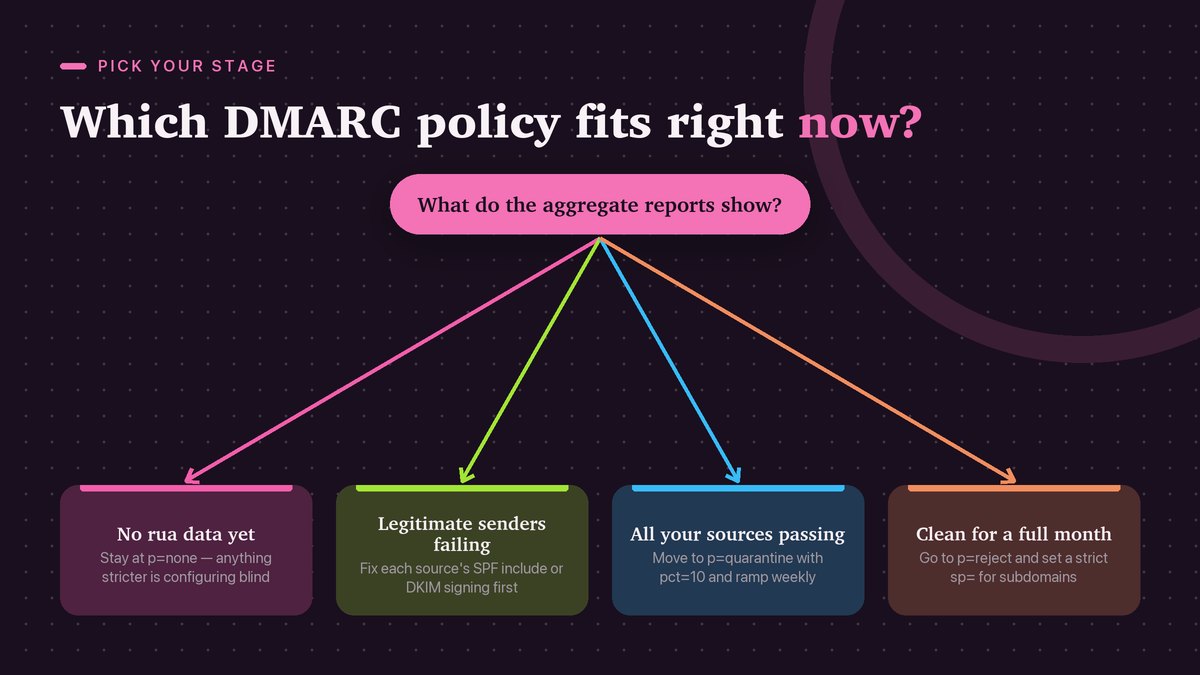
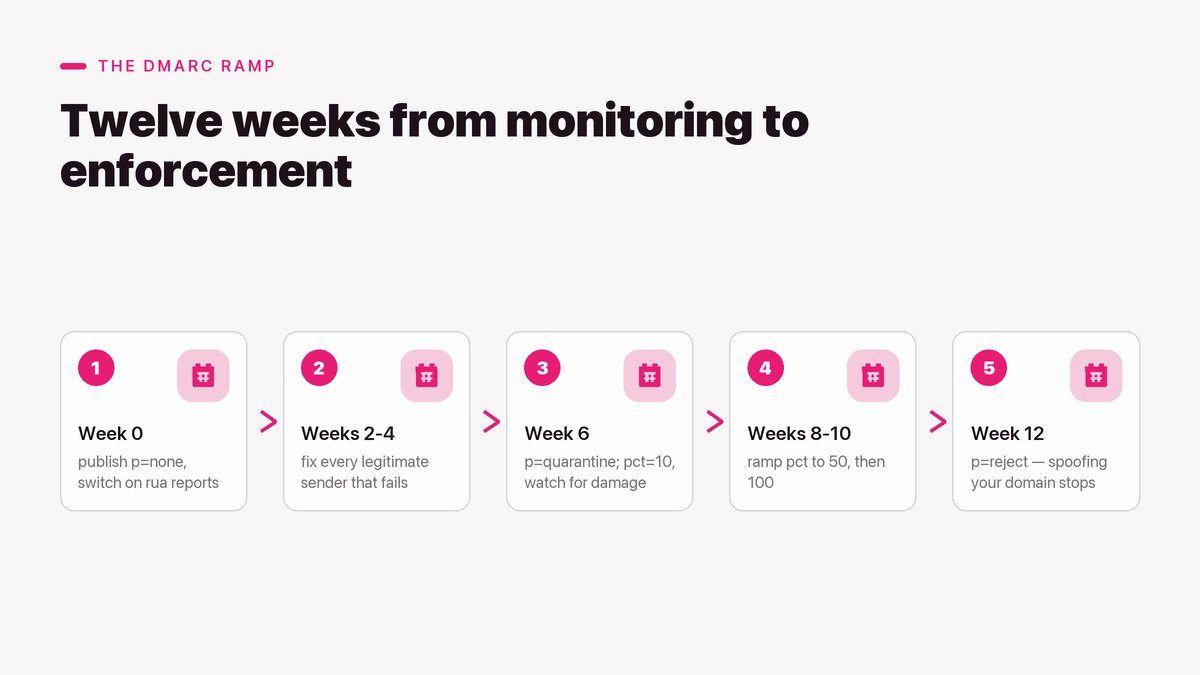
The standard advice is to start at p=none, and it’s correct, but people misread what the stage is for. A p=none record changes nothing about delivery, since it exists purely to turn on the reporting firehose. Its only job is to answer one question over two to four weeks: what legitimate mail do we send that currently fails? Every failure you find is a sender to fix, whether that means adding its SPF include, setting up its DKIM, or changing how it sends. You shouldn’t move to quarantine unless the reports show your legitimate sources passing consistently.
From there the ramp uses the pct tag, which applies the policy to a stated percentage of failing mail. A record reading p=quarantine; pct=10 sends only a tenth of failures to the junk folder and treats the rest normally, so you can watch for collateral damage before widening the net to pct=25, pct=50, and finally pct=100. The whole climb from p=none to p=reject typically runs two to three months for a small domain, most of it spent waiting on reports. The end state is the one Google’s guidelines push everyone toward, because Gmail began enforcing a DMARC quarantine policy against anyone impersonating Gmail’s own From: addresses, and it plainly expects the same posture from bulk senders. Once you’re at p=reject there’s a prize on the far side, BIMI, the standard that displays your verified logo next to your messages in the inbox. It demands an enforced policy plus a Verified Mark Certificate that runs roughly $1,000 a year, though, so in practice treat it as optional dessert rather than the goal of the exercise.
The failures that show up in the reports
Aggregate DMARC reports from real small-business domains repeat the same handful of stories, and recognizing them early saves you a week of confusion.
- The duplicate SPF record. Two v=spf1 TXT records at the root, usually the residue of switching email providers, produce permerror at every receiver. Merge the mechanisms into one record and delete the other; nothing else about the migration matters until this is fixed.
- The lookup bomb. A record whose includes total eleven or more DNS queries fails closed under RFC 7208’s ceiling, and because includes nest, the real count is higher than the record suggests. Flattening services exist, but I’d drop senders you no longer use, which also shrinks your attack surface.
- The ghost sender. Reports show a third of your volume arriving from an IP range you don’t recognize, passing nothing. Half the time it’s a forgotten tool still holding your SMTP credentials; the other half it’s someone spoofing you. The difference matters, because one needs a password change while the other is exactly what p=reject exists to stop.
- The forwarding casualty. An @aol.com subscriber who auto-forwards to Gmail generates SPF failures that aren’t your fault, which is why DMARC accepts DKIM alignment alone. Letting a signing keypair lapse because “everything passes anyway” is a slow-motion outage for your forwarded readers.
- The permanent p=none. Domains that published a monitoring record in 2016 and never opened a report sit there collecting XML while spoofers exploit them with impunity. p=none protects nobody, since it’s a diagnostic you run on the way to an enforced policy.
The other half: spam rates and one-click unsubscribe
Authentication got the headlines in 2024, but the requirements bundled it with behavioral rules that probably kill more senders than DNS ever will. Google requires bulk senders to keep the spam rate in Postmaster Tools, its free dashboard for exactly this, below 0.30%. Its own guidance is blunter than the number, telling you to stay under 0.10% because a domain flirting with 0.3% has no resilience when one bad campaign spikes the rate. Postmaster Tools itself takes ten minutes to set up. You verify the domain with a TXT record, and within a day or two you get dashboards showing your spam rate, your authentication pass rates, and a domain reputation grade on a four-step scale from Bad to High. Yahoo’s sender requirements mirror the same 0.3% ceiling, so the two largest mailbox providers in North America now enforce a shared definition of acceptable complaint levels.
One-click unsubscribe is the other behavioral rule with a deadline, June 1, 2024 for bulk senders, and it has a specific technical shape. Two headers defined in RFC 8058 do the work: List-Unsubscribe points at an HTTPS endpoint and List-Unsubscribe-Post is set to List-Unsubscribe=One-Click, so Gmail’s unsubscribe button completes the request with a single POST instead of sending the user to a preference page. Most major platforms added the headers automatically during 2024, but senders running their own mail servers or older marketing tools had to build them. The requirement has a second half that’s easy to miss: honor the unsubscribe within two days. If your list tool still routes unsubscribes through a landing page that asks for a password, the header alone won’t save you from complaints. Recipients who can’t escape quickly reach for the spam button instead.
Verifying the setup without trusting anyone’s dashboard
Every claim above is checkable from a terminal in under a minute, which is the right way to close this out. DNS either says what you think it says or it doesn’t. dig TXT yourdomain.com shows your SPF record and any duplicates sitting beside it. dig TXT s1._domainkey.yourdomain.com confirms the DKIM public half is published where your provider said it would be, and dig TXT _dmarc.yourdomain.com shows the policy and the rua address actually in force rather than the one in your notes. Google maintains a free Admin Toolbox dig tool for people who’d rather click than type. It doubles as a way to check the PTR record, the forward-and-reverse DNS requirement that Google’s guidelines impose on sending IPs.
Then send yourself proof. Mail a message from each of your sending systems to a Gmail address you control, open it, and choose Show original from the three-dot menu. The authentication results block should read spf=pass, dkim=pass, dmarc=pass, with the domains named next to each line. A pass on one test message proves the record works; a pass from every system in your inventory proves the rollout is done, and that difference is the whole game. The 2024 rules turned authentication from a consultant’s upsell into table stakes, but the work stays small. In practice it’s one merged SPF record, one DKIM setup per sender, and one DMARC record that climbs from none to reject over a quarter. The domains that finished this in early 2024 stopped thinking about it by summer, which is more than can be said for the ones still collecting 5.7.26 rejections and wondering why their newsletter suddenly stopped arriving.