In this article
- The report row that made me distrust my own numbers
- What a UTM parameter actually is
- The rules that decide whether your data is readable
- Naming conventions that survive a real team
- Auto-tagging, gclid, and the click IDs you didn’t add
- Where the tags land inside GA4
- The mistakes that quietly corrupt a campaign report
- Inheriting a mess: the audit before the policy
- A tagging policy that fits on one page
The report row that made me distrust my own numbers
Some years ago I opened a traffic acquisition report for a client who had just spent about $4,000 on a three-month newsletter sponsorship, and the medium column read like a confession. It showed email, Email, EMAIL, e-mail, and newsletter, five rows for what was supposed to be one campaign, because every link in that sponsorship had been tagged by hand by a different person and GA4 had faithfully counted five different sources. The sponsorship hadn’t failed; the tagging had. Since the spend was real and the conversions looked thin, the client nearly cancelled a placement that was probably working, which is an expensive way to learn that UTM hygiene is a money question even though nobody sells it that way.
That’s the part of campaign tracking nobody warns you about when they hand you the Campaign URL Builder. UTM parameters are free and take about thirty seconds to add. Google’s own documentation describes them as “short text codes that you add to URLs (or links) to help you track the performance of web page or app campaigns.” That’s true and also useless as a warning, because the failure mode isn’t a broken link but a clean-looking report that’s wrong in a way nothing flags. A mistagged link still loads the page and the analytics tag still fires, so the only symptom shows up weeks later, when the channel that spent the money can’t prove it and the channel that spent nothing inherits the credit.
This article is the version of UTM guidance I wish someone had handed that team. It covers what the five parameters actually do and why GA4’s default channel groupings make some medium values safe and others expensive. It also walks through how auto-tagging and click IDs like gclid interact with manual tags, plus the short list of conventions that keep a tagging scheme readable after the person who invented it leaves. None of it requires a paid tool. Almost all of it requires deciding on the conventions before the first link goes out, because retrofitting a naming scheme onto six months of mixed data is a cleanup project rather than a settings change.
What a UTM parameter actually is
A UTM parameter is a name and a value appended to a URL after a question mark, and the name itself is a fossil. UTM stands for Urchin Tracking Module, after Urchin Software, the San Diego analytics company Google acquired in April 2005 and rebuilt into Google Analytics; the five fields Urchin’s engineers chose are still the entire vocabulary.
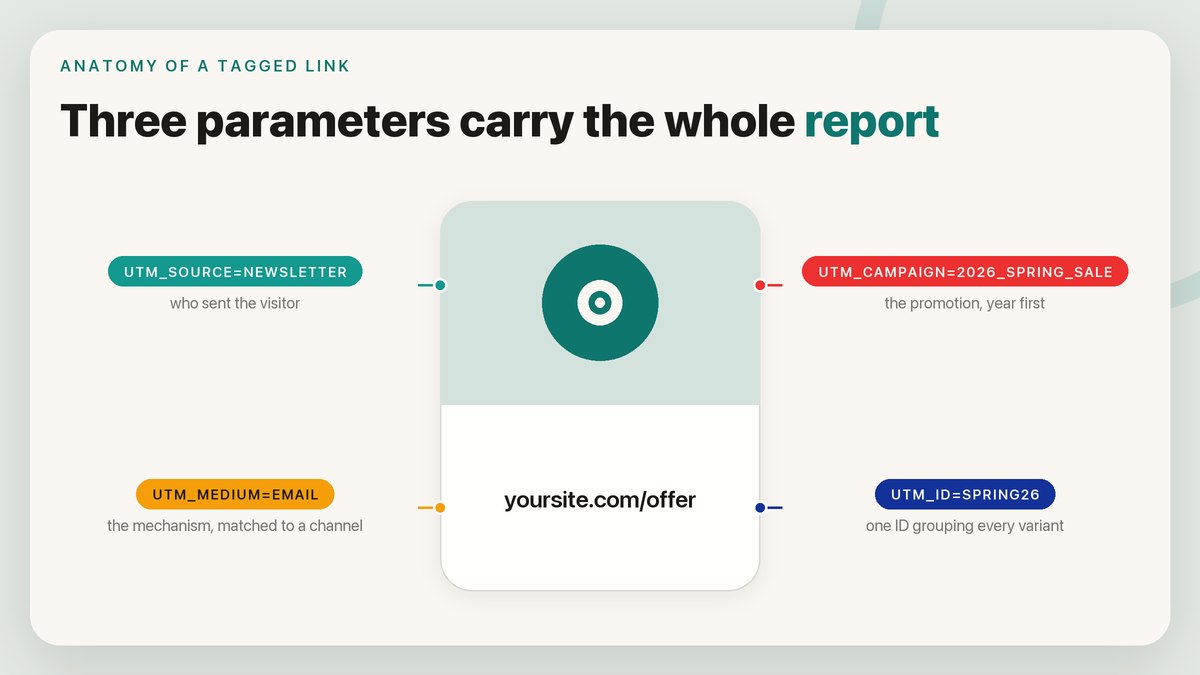
- utm_source, where the click came from: google, newsletter, instagram, a partner’s domain.
- utm_medium, the mechanism: email, cpc, social, display, qr, affiliate.
- utm_campaign, the promotion itself: 2026_spring_sale, onboarding_v2.
- utm_term, paid keyword data, mostly ignored outside search ads.
- utm_content, the variant: which of two buttons, which of three banners, which slot in a newsletter.
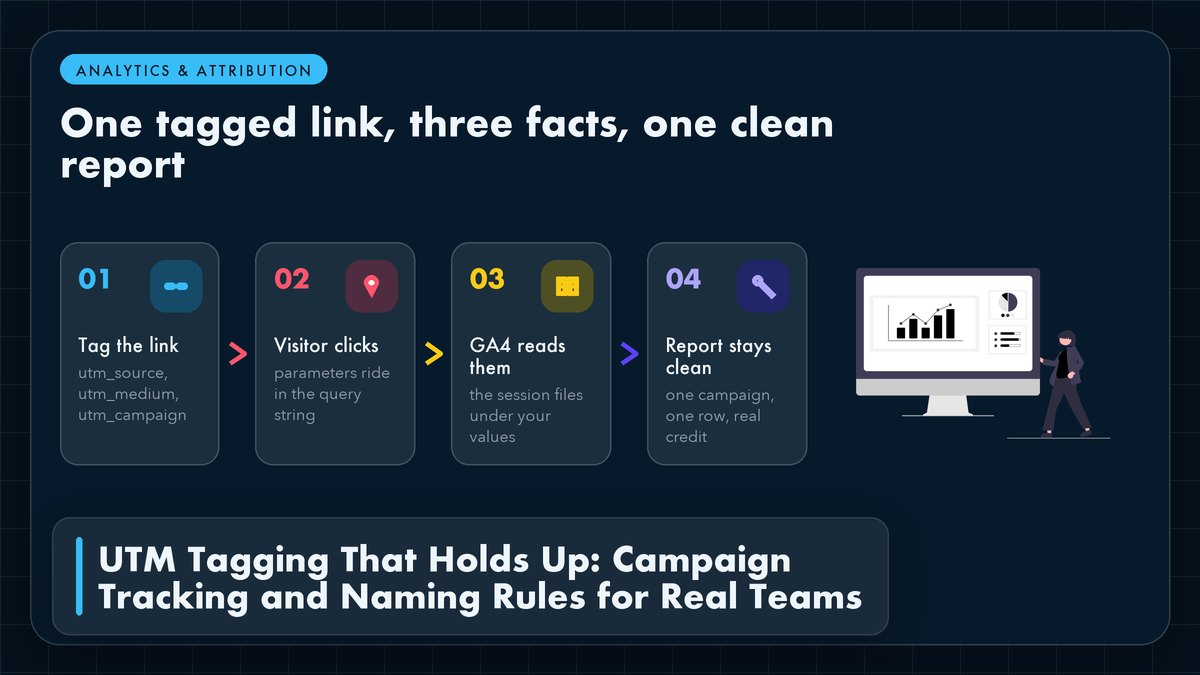
Only source, medium, and campaign are required by Google’s Campaign URL Builder at ga-dev-tools.google, and those three between them answer who sent the visitor and for which promotion, which is what a report needs to know. A tagged link ends up looking like yoursite.com/offer?utm_source=newsletter&utm_medium=email&utm_campaign=2026_spring_sale. The page loads exactly as it would without the tags, because the parameters just sit in the query string while the analytics tag reads them at page load and GA4 files the session under those three values instead of guessing from the referrer header.
That fallback is the whole reason tagging exists, because the HTTP referrer is a poor witness. Most email clients and many apps send no referrer at all, so an untagged newsletter click shows up as (direct) / (none), indistinguishable from someone typing your URL from memory; links pasted into Slack, WhatsApp, or a text message land in the same bucket; marketers call that traffic dark social. If your direct traffic share looks suspiciously healthy, some of it is probably campaigns you never tagged.
The rules that decide whether your data is readable
UTM values are case-sensitive strings, and that one property causes more fragmented reports than everything else combined. Spring_Sale and spring_sale are two different campaigns as far as GA4 is concerned, so they’ll appear as two rows in every report and make a single promotion look half as effective as it was. The fix costs nothing: lowercase everything, always, and write the rule down where the tagging happens rather than in a wiki nobody opens. Spaces are the second trap, because a space in a URL has to be percent-encoded as %20 under the URL syntax rules in RFC 3986, so spring sale becomes spring%20sale and reads badly in every export; use a hyphen between the words instead, and stick with it, since spring-sale and spring_sale fragment into separate rows just as reliably as the capital letters did.
The medium field answers to a stricter master than taste, namely GA4’s default channel groupings. GA4 assigns every session to one of its default channel groupings, like Paid Search or Email, using the source and medium values it receives, and it matches on exact strings and regular expressions rather than on what you meant. For the Email channel the medium must be email or e-mail; for Paid Search it must be cpc, ppc, or paidsearch; for Organic Social the value has to match a pattern built from words like social and social-network. If you tag a paid newsletter sponsorship as utm_medium=newsletter, which is a perfectly sensible word, GA4 shrugs and drops the session into Unassigned, so your channel report undercounts email while a bucket nobody reads quietly fills up. Google publishes the current matching rules in its documentation on traffic-source dimensions, and they’re worth checking before you invent a value, because the patterns do change over time.
There’s a subtler version of the same mistake that accumulates slowly: near-synonyms. One quarter’s agency tags everything cpc, the next quarter’s freelancer uses ppc, a summer intern writes paid-search, and your Paid Search trend line now has three authors and no consistent definition. In practice the medium column should hold fewer than a dozen distinct values across the entire life of an account, and each one should exist because a channel grouping depends on it, not because someone was describing the campaign vividly.
Naming conventions that survive a real team
Conventions usually fail in predictable ways, and they tend to fail faster with more hands, so the scheme you choose should assume the person applying it has never read your documentation. The pattern I’d defend in most small operations builds campaign names from a date and a promotion, in that order, giving 2026_spring_sale rather than spring_sale_2026, because a year-first scheme sorts chronologically in every report and spreadsheet without any effort. Add a variant suffix in utm_content when you’re testing creative, say hero_banner versus text_link inside the same newsletter, and resist the urge to encode the whole org chart in the campaign name, since anything longer than about four words stops being typed consistently after the second month.
Source values deserve the same discipline plus one extra rule: name the placement, not the platform’s corporate family. If the same company sends the link from two newsletters with different audiences, those are two sources, because you’ll want to compare them; if one newsletter carries the link three times, that’s one source and three utm_content values. A workable test for any proposed value is whether two people tagging independently would produce the same string. “newsletter” passes if the company sends one newsletter and fails if it sends three, at which point the value should have been the newsletter’s actual name all along.
Whatever scheme you land on, make a builder do the typing instead of trusting memory. Google’s Campaign URL Builder generates the tagged URL from a form, and because GA4 added support for utm_id, a campaign ID that groups source, medium, and campaign variants under one identifier, the GA4 tab of the builder can stamp every link in a campaign with the same ID even when the other fields drift. That single field is cheap insurance against exactly the fragmentation described above, and almost nobody uses it, even though it turns a naming dispute into a non-event.
Auto-tagging, gclid, and the click IDs you didn’t add
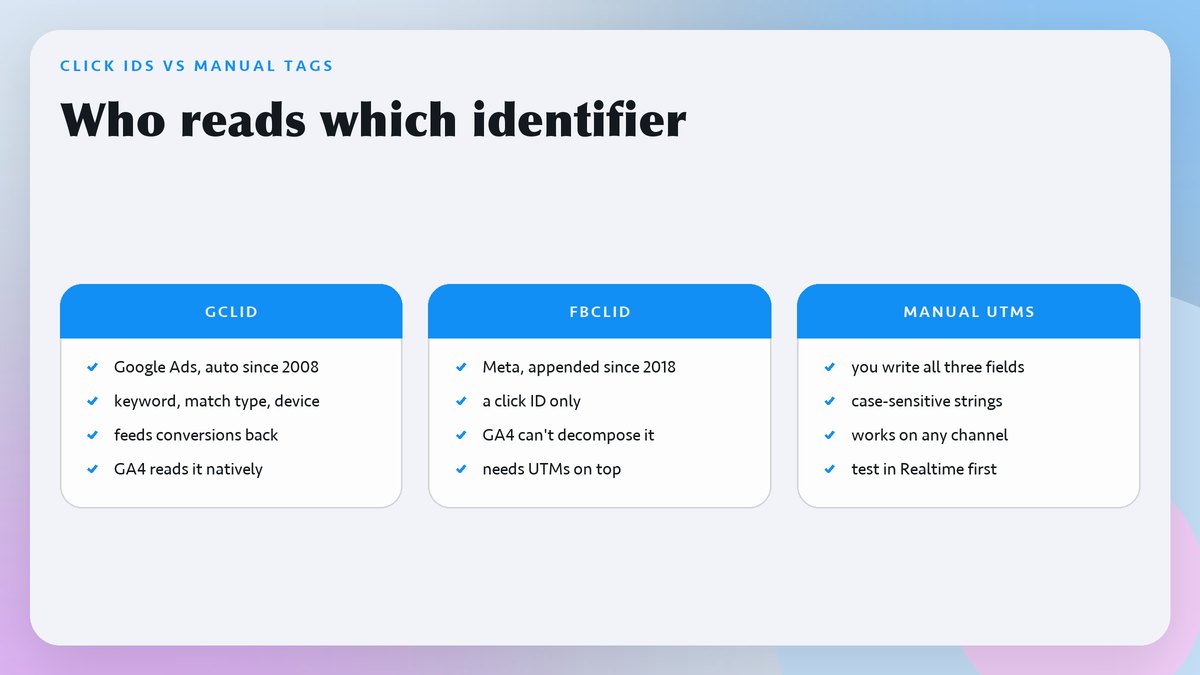
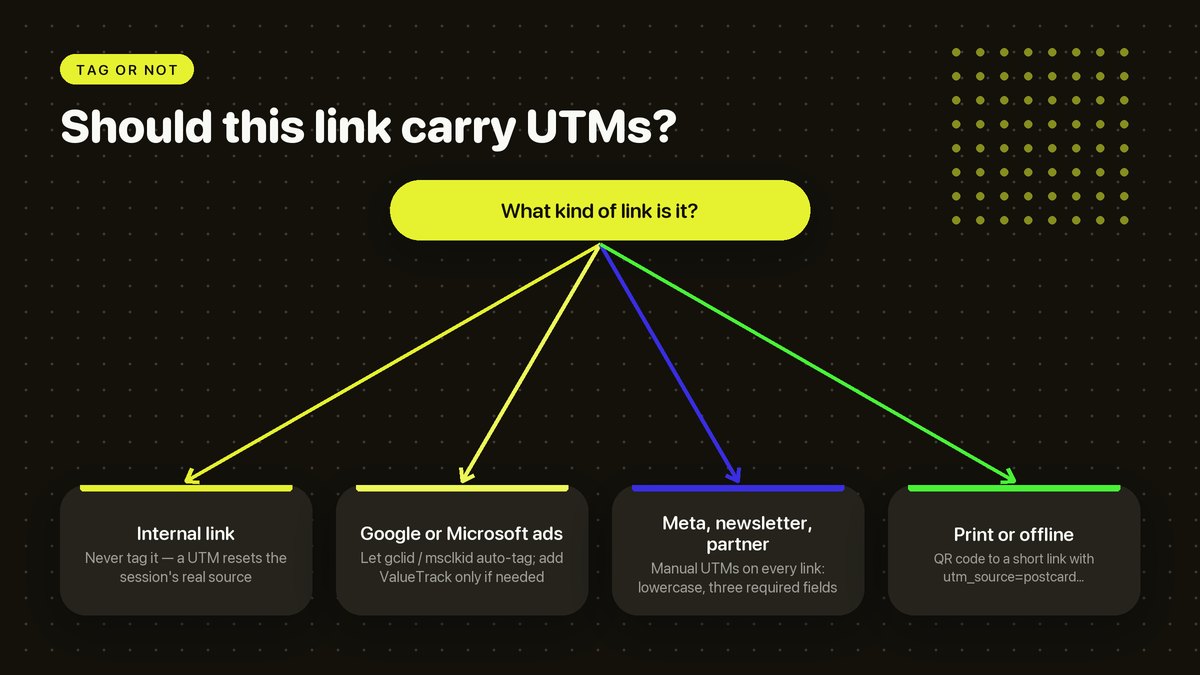
Before you tag anything, check what the ad platforms are already tagging for you. Google Ads appends a gclid to every destination URL when auto-tagging is on. The gclid is a Google click identifier unique to each click, and auto-tagging has been the default for new accounts since Google introduced it in 2008. It carries more than UTMs can, because it encodes the campaign, ad group, keyword, match type, and device behind each click, and it also feeds conversion imports back into Google Ads, which is why leaving it on matters more than any manual tag you’d add on top. Tagging the same Google Ads links manually doesn’t improve the picture; it competes with it, because Google Ads has a documented account setting called “Allow manual tagging (UTM values) to override auto-tagging,” and if someone checked that box back in 2019, your hand-built tags silently win over the richer click ID. Leave auto-tagging alone for Google Ads, reach for ValueTrack parameters like {keyword} and {matchtype} only when you need keyword-level detail inside GA4, and spend your manual-tagging effort on the channels that have no click ID at all. Microsoft Advertising works the same way through its msclkid, so the same rule covers Bing campaigns without a second policy.
Meta is the opposite case and causes most of the confusion I see. Since 2018 Facebook has appended fbclid to outbound links, but fbclid is only a click identifier; GA4 can’t decompose it into source, campaign, and content the way it reads UTMs, so an untagged Facebook link still reports as referral traffic from facebook.com with no campaign attached. Every Meta placement you care about needs manual UTMs. Typically that’s utm_source=facebook or instagram, a medium that matches the channel grouping you want, and a campaign name copied from whatever the campaign is called in Ads Manager. The rule of thumb that covers most accounts is short: if the platform gives you a click ID that GA4 can read, such as Google’s gclid or Microsoft’s msclkid, let it do the work; if it doesn’t, tag by hand, every link, every time.
Where the tags land inside GA4
Knowing which report a tag feeds changes how carefully you tag, because GA4 keeps three families of source and medium dimensions that answer different questions. First-user dimensions describe how someone originally found you and never change for that user; session dimensions describe how this particular visit arrived; manual dimensions describe what your UTMs said. The Traffic acquisition report defaults to session source/medium, which is why a returning customer who first arrived through a paid ad in March and clicks an untagged bookmark in May counts as direct in May, since the tag only claims the session it actually delivered. When you judge a campaign, judge it on the sessions it brought, and open the User acquisition report separately if what you really want to know is where customers originally came from.
Two readings matter before you trust any of it. First, test every tagged link the day it’s built: click it yourself and watch GA4’s Realtime report, where the event usually appears within seconds carrying your campaign name, or use DebugView with the GA Debugger Chrome extension if you want parameter-level detail. Standard reports process data with a lag of 24 to 48 hours, so they are not a place where mistakes get discovered; they’re where mistakes get believed. Second, watch for (not set), GA4’s placeholder for a dimension it expected and didn’t receive, because a session with a campaign but no source usually means the URL was mangled somewhere between the email client and the browser, and some clients really do strip or rewrite query strings.
There’s also a privacy shift worth knowing about, although it hasn’t bitten UTMs hard yet. Apple’s link tracking protection, which shipped with iOS 17 in September 2023, strips known tracking parameters from links opened in Mail, Messages, and Safari’s Private Browsing. UTMs usually survive it, because Apple targets fingerprinting-style parameters, but click IDs like gclid can be removed in those contexts, which is one more reason manual tags remain worth learning even on platforms that auto-tag.
The mistakes that quietly corrupt a campaign report
Every one of these shows up in real accounts, and most survive for months, sometimes longer, because nothing looks broken at the time:
- Tagging your own internal links. A UTM on a link between two pages of your site starts a new session attribution, because GA4 treats the tagged click as a fresh campaign arrival and overwrites the session’s real source. The customer who came from a $500 ad and then clicked a tagged “Shop now” banner is now recorded as a newsletter conversion. Never tag internal links; measure on-site clicks with events or page paths instead, because those don’t touch attribution.
- Tagging the canonical link. If your campaign URL with UTMs gets shared or scraped by an aggregator, you can end up with attribution flowing to a URL you don’t control. Tag the destination, keep canonicals clean, and let redirects carry the tags where that’s possible.
- Letting two mediums describe one channel. cpc for some Google campaigns, ppc for others, paid-search for a third gives you three rows, one budget line, and a channel report nobody can read at a glance. Pick the medium GA4’s channel grouping expects and hold that line in the policy doc.
- Decorating the query string. Every parameter you add rides along in the page location, and GA4’s standard reports aggregate on those strings, so a link carrying five UTMs plus a click ID plus a pixel parameter can push toward the 2,083-character URL ceiling older browsers imposed. Even when nothing breaks, the page reports turn to soup. Tag what gets measured and drop what doesn’t.
- Printing bare URLs on offline material. A QR code on a postcard can carry a full tagged URL with utm_source=postcard and utm_medium=qr, and no one has to type anything, so the “offline doesn’t track” excuse died years ago. Run the QR through a short link you control, though, because a 90-character tagged URL printed at postcard size often won’t scan.
Inheriting a mess: the audit before the policy
If you’re reading this with a year of fragmented data already in the account, the first thing to accept is that you can’t retag history. GA4’s standard reports are aggregations, not editable rows, so no setting merges EMAIL and email after the fact; what you can do is fix forward. Export the acquisition reports for the past 12 months and cluster the near-duplicate source, medium, and campaign values in a spreadsheet. Then turn that cluster list into a mapping sheet, with every variant that ever shipped on the left and the one canonical value it should have been on the right. That sheet is usually half an hour of work, and it doubles as the audit trail when someone asks why the email channel suddenly tripled.
Then pick a cutover date and mark it. GA4 added report annotations in 2023, so you can drop a note on the timeline that says “tagging conventions changed,” which saves the next analyst from reading the step change as a performance miracle. It’s worth remembering that Universal Analytics, retired on July 1, 2023, kept campaign attribution alive for six months by default, so old UA comparisons can look kinder to campaigns than GA4 ever will; if a stakeholder waves a 2022 report at you, that timeout is usually part of the explanation. From the cutover date onward, the policy below applies to every new link, and within a quarter the clean data outweighs the noisy history in every trend chart that matters.
A tagging policy that fits on one page
The accounts with clean attribution all have the same artifact: a single page, whether it’s a shared doc, a pinned message, or a README next to the password manager, that answers the tagging questions before anyone asks them. Mine has six lines, and they’ve survived two agencies and one rebrand:
- Everything lowercase, always; one separator character inside values, never a space.
- Mediums come from the approved list only: email, cpc, paid-social, social, display, affiliate, referral, qr, print.
- Campaign names start with the year: 2026_spring_sale, never spring_sale_2026.
- Google Ads stays on auto-tagging; nobody touches the override checkbox.
- Internal links never get UTMs; every external campaign link gets all three required parameters plus utm_id.
- Every tagged link gets clicked once and confirmed in Realtime before the send goes out.
Notice what that policy actually does, line by line: it removes judgment calls. Tagging quality is rarely a skill problem, because the parameters themselves are trivial, so treat it as a coordination problem and make the correct action the only easy one. A builder form with the conventions baked in, a medium list taped to the doc, and a Realtime check in the launch checklist will do more for your attribution than any analytics upgrade, and it will keep working after the person who set it up leaves, which is the only test a convention ever really has to pass.